The DMC60 drum machine
for modern Macs.
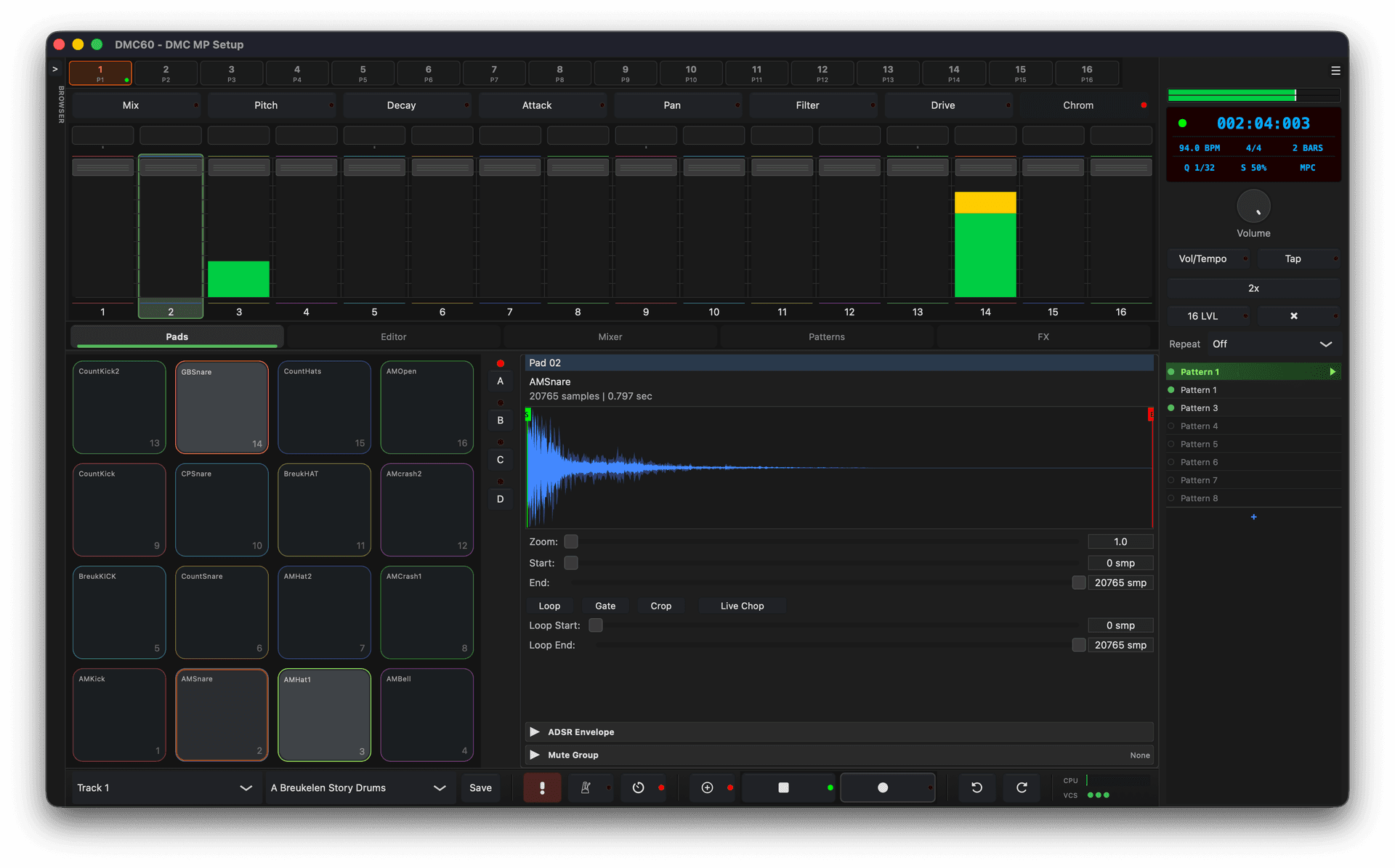
DMC60 turns folders of samples into playable kits, sequences them with hardware-style swing, and runs every voice through a gritty 12-bit / 26.04 kHz engine with an SSM2044-style filter.
Don’t explain the grit.
Play it.
The current page sells the specs well. The fastest marketing win is putting sound, motion, and proof above the fold. These are placeholders until final audio and screenshots are ready.
Sample kits take too long.
Most samplers make you drag, map, trim, rename, save, repeat. DMC60 makes kit building feel like loading a drum machine again.
Folders become programs.
Point DMC60 at one folder, each subfolder, or a whole library tree. It creates ready-to-play .dmcpgm programs automatically.
Dirty fast, not dirty slow.
You get the 12-bit attitude, hardware swing, choke behavior, and MIDI controller hands-on without losing a day to file management.
Internally downsampled.
Every sample is converted to 26.04 kHz with Lagrange interpolation and a ~13 kHz anti-alias path. The aliasing isn’t a bug — it’s the dust on the record.
Quantized on purpose.
A 12-bit signal path (–2048 / +2047) restores the bite of early hardware samplers. Quiet sources break up. Loud sources punch.
Ladder filter, modeled.
Four-pole, 24 dB/oct, with smooth resonance and self-oscillation. The same circuit family that gave a generation of drum machines their voice.
Most plugins try to make samplers sound clean. DMC60 does the opposite. The internal pipeline — sample-rate conversion, bit reduction, ladder filter, drive — is tuned to get out of the way of the sound and let the medium speak.
16 pads. 8 banks.
Unlimited programs.
128 sample slots per program, organized the way drum machines were always meant to be — pads on the bottom row, banks A–H on the wing, programs as your kits. Per-sample pitch, loop, ADSR, filter, drive and pan, all live.
Save kits as .dmcpgm programs with embedded samples, tags, and authoring metadata. Browse a factory library or your own, search by name or tag.
Drop a break in.
Chop it four ways.
Hit pads to the beat and DMC60 drops slice points in real-time — non-destructive, marker-only, the sample stays whole. Or let the onset detector watch spectral flux and mark every transient. Or divide by count. Or place them by hand. Slices land on pads with a shared mute group, ready to play.
Point at a folder.
Get a kit.
Building a sample kit by hand is the slowest part of every drum machine. DMC60 ends it. Hand it a folder of WAV / AIFF / FLAC files and it builds a finished .dmcpgm program — pads filled, banks laid out, ready to play. Hand it a sample library and it builds the entire library, in batch, in a single pass.
No other plugin sampler does this. What used to be an afternoon of dragging files into slots is now a click.
99 patterns,
99 mixes.
Every pattern carries its own mixer state — levels, pans, sends, mutes — so switching patterns swaps the mix with the beat. No snapshot juggling, no extra recall step. A 96 PPQN engine drives customizable bar lengths, up to 4 bars per pattern, with full undo/redo, count-in, metronome, and an erase mode that scrubs notes under your fingers in real-time.
Patterns become
arrangements.
Song mode is a list, not a maze. Add a pattern, set how many times it repeats, drop in tempo and mix moves between rows, and loop any region while you tweak. Build a full arrangement in the time it takes to remember which bar you were on.
Plays nicely with
the controller you love.
Plug in any class-compliant MIDI controller. Pads trigger voices, knobs and faders address volume, pan, tune, ADSR, filter, drive, master and tempo over a fixed CC map on Channel 4. Aftertouch is wired through. No mapping screen, no JSON files.
Hot-plug detection brings the controller online mid-session — no restart, no rescan. The MIDI controller layer is pluggable, so new hardware can be added without touching the processor.
Built to live in,
not just to demo.
A floating sample editor with zoom, start / end, and loop handling. An on-screen keyboard with QWERTY mapping for laptop jams. A preset browser with search and tags. Five LCD color themes, scalable UI, and persistent window state — the things you need when DMC60 is open all day.
‘Point it at a folder, get a playable program back. The fast part is not having to map 128 samples by hand.’
‘The 12-bit engine, 26.04 kHz conversion, drive, and SSM2044-style filter make clean samples feel like they came from a dedicated drum box.’
‘Per-pattern mixer states, customizable bar lengths, swing, song rows, and real-time erase keep the sequencer useful beyond quick demos.’
Get the free beta.
macOS 10.13 or newer. Signed installers, release notes, and beta feedback are coming soon.
Is this an SP-1200 clone?
No. It is inspired by the workflow and sonic attitude of early sampling drum machines, with its own engine and modern plugin workflow.
Which DAWs are supported?
Any macOS DAW that loads AU or VST3 instruments. The standalone app works without a host.
Is Windows coming?
Placeholder: macOS is first. Add a waitlist CTA here if Windows support is on the roadmap.
Can I use my own samples?
Yes. WAV, AIFF, AIF, and FLAC are supported, including folder-to-program batch creation.